Showing posts with label instagram. Show all posts

New Updated 2018 Instagram cool tools tricks in hindi

New Updated  2018   Instagram  cool tools tricks in hindi

New Updated  2018   Instagram  cool tools tricks in hindi
New Updated  2018   Instagram  cool tools tricks in hindi

post by:-Mahendra Raiger

 Instagram तो सभी लोग use करते होंगे, instagram top social networks मे से एक आता है और इसके करोडो users भी है|

तो दोस्तों आज इस post मे 2018 के कुछ instagram features के बारे मे बताने वाला हु| आपको बतादे की instagram कम्पनी ने कुछ ऐसे features update किये है जो आप इस साल 2018 मे देख पाएंगे, उनमेसे एक feature जो आपके बहुत काम आने वाला है| तो इस post को लम्बा ना खिचते हुए सिधे आपको बताऊंगा| तो चलिए शुरू करते है

2018 के New instagram Features

तो दोस्तों instagram के new features का इस्तमाल करने के लिए सबसे पहले आपको instagram play store से update करना होगा, तभी आप इस features का लुफ्त उठा सकते हो|

Image Zoom In/Out

 instagram मे आपको सबसे पहले image zoom in zoom out का feature देखने को मिलेगा जो पुराने varsion मे नही था| किसी भी image को zoom in out करने के लिए आपको normaly image पर click करना होगा और उसके बाद जैसे आप mobile image के gallery मे zoom in out करते है बिलकुल वैसा ही करना है|

Profile Photo Full Size Me मे देखे

 जब आप पुराने instagram varsion मे किसी का profile photo full size मे देखने की कोशिस करते थे तो नही देख पाते थे, क्योकि instagram मे profile photo full size मे देखने का feature दिया ही नही था|

 लेकिन आपको instagram के इस नए varsion मे ये feature देखने को मिलेगा, उसके लिए आपको क्या करना है जिसका भी आप profile photo देखना चाहते है तो उसके profile photo पर click कर दे, तो उसके बाद profile photo full size मे आपको दिखाई देगा, और उसके साथ आप उस photo को zoom in और zoom out भी कर सकते है|

Download Instagram Photos/Videos

 जैसे की मैंने ऊपर कहा था की instagram का एक feature बहुत ही खास है जिससे हम अपने मन पसंद photos और videos आसानी से download कर सकते है|

 आपको बतादे की ये feature instagram के old varsion मे नही था, लेकिन instagram companey ने अपने users के लिए ये feature भी add कर दिया जिससे हम किसी भी photos और videos को download कर सकते है|

 instagram के किसी भी photos और videos download करने के लिए आपको video के या photo के ऊपर जो 3 डॉट्स होते है उनपर click करना है, उसके बाद आपके सामने कुछoptions open होने उनमेसे आपको download नाम का option दिखाई देगा, तो उस option पर click करना है, उसके बाद आपको कुछ परमिशन देनी होगी तभी आप photos या videos download कर सकते हो| instagram के videos और photos कैसे download करते है इसके बारे मे अलग post बनाऊंगा|

तो दोस्तों ये थे instagram के कुछ features जो अभी 2018 मे update हुए है|

तो दोस्तों अगर आपको ये post अच्छी लगी तो अपने दोस्तों के जरुर share कीजयेगा

instagram new features tricks in hindi

instagram new features  tricks in hindi

instagram new features  tricks in hindi
instagram new features  tricks in hindi

post by:-mahendra raiger

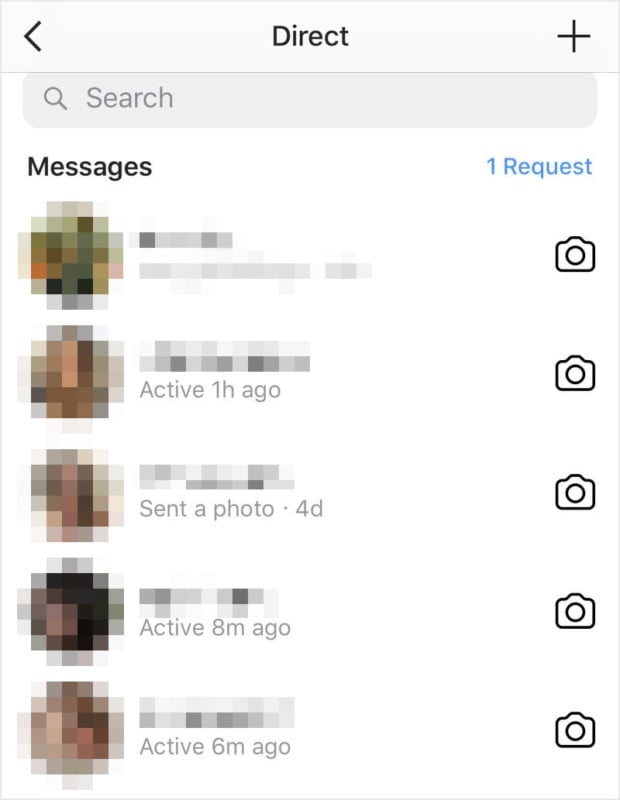
Instagram ने एक बार फिर से नया अपडेट जारी किया है। नए अपडेट के बाद आपको व्हाट्सऐप जैसा ही इंस्टाग्राम में भी पता चल जाएगा कि कोई यूजर्स लास्ट कितने बजे तक एक्टिव था। हालांकि यह फीचर आपको न्यूज फीड में नहीं दिखेगा। इसके लिए आपको इंस्टाग्राम मैसेजिंग सेक्शन में जाना होगा।

लास्ट सीन या लास्ट एक्टिव फीचर फेसबुक मैसेंजर और WhatsApp में बहुत पहले से ही है। वहीं अब फेसबुक ने इसे अपने प्लेटफॉर्म Instagram के लिए भी जारी किया है। बता दें कि इंस्टाग्राम फेसबुक के स्वामित्व में है।


इंस्टाग्राम ने लास्ट सीन फीचर को Show Activity Status के नाम से जारी किया है जो डिफॉल्ट रूप से एक्टिव होगा लेकिन आप चाहें तो सेटिंग्स में जाकर इसे डी-एक्टिव भी कर सकते हैं। हालांकि अगर आप अपना एक्टिविटी स्टेटस ऑफ कर देते हैं तो आप दूसरे की भी एक्टिविटी स्टेटस नहीं देख पाएंगे। यह फीचर जल्द ही एंड्रॉयड और iOS के लिए पूरी तरह से रिलीज कर दिया जाएगा।


How to make instagram account private in hindi

How to make instagram account private in hindi


post by:-mahendra raiger

 Hello friends pc hindi tricks main aap ka suwagat hai iss post me ham Instagram ke bare me janenge. Pahle se aap jante hai ki social networking website me Facebook, twitter bahut hi famous website hai aur inke users bhi bahut adhik hai. Jaise samay age badha raha hai naye naye social network website aa rahe hai. Aise hi ek new social networking website Instagram hai. Abhi tak dekha jaye to sabse acha features aur badhiya social networking website Facebook hai jo hame friends banane, message send karna, audio aur video apne friends ke sath share karna, friends ke sath chat karna etc.  features provide karti hai aur sabse achi baat ye hai ki  hamesha kuch na kuch update karte rehti hai(yani ki nya features jodte rehti hai.

Sabse pahle orkut naam ki social networking site bahut use hoti thi aur aaj sabse jyada Facebook use hoti hai. Badlte samay ke anusar social networking site ki popularity aur user bhi badal gaye hai. Aaj ham baat kar rahe hai Instagram ke baare me ye ek naya ubharta hua social site hai jiski popularity India me teji se badh rahi hai. Aise me bahut sare aise facebook aur twitter ke user hai jo janana chate hai ki Instagram kya hai aur iske kya feature hai. Aaye ham sabse pahle Instagram kya hai ke baare me vistaar rup se jaante hai.

Instagram Kya Hai?

Instagram ek Social Networking website hai jis par aap apni photos, message ya video upload kar ke apne friends ya followers ke sath share sakte hai. Instagram ko basically mobile me use karne ke liye banaya gaya hai .Aap isse dekstop me bhi use kar sakte hai lekin photo aur video upload karne ke liye aapko third party website ka use karna hota hai.
Instagram ko 6 october 2010 ko Kevin Systrom aur Mike Krieger ke dwara shuruat ki gayi thi. Instagram ko sabhi tarah ke smart phone me use ho sakei aisa application bnaya gya hai chahe vo android, windows ya fir ios operating system vali phone ho. Instagram filhaal 33 language(bhasha) me uplabdh hai.

Instagram Par Account Kaise Banaye ?

Instgram par account banana bahut hi asaan hai iske liye aap hamare dwara bataye gaye simple steps ko follow kare.
Steps:
Step 1.Sabse pahle instagram.com website pe jaye.
Step 2.Ab website pe jaane  ke baad signup form ko bharna hota hai.

  1. Apni mobile number/email id likhe.
  2. Apna Full Name likhe.
  3. Apna account ke liye username likhe.
  4. Password likhe.
  5. Ab Signup button click karte hai.
Step 3.Ab jo email aapne diya hai usse open kare aur instgram se gaye hue mail ko open kare verification link pe click kare.
Step 4.Ab aapka Instagram par account ban gaya hai. Ab ek new page page open hoga isme aap apna profile pic choose kare au upload kar le.
Ab aapka instagram account bilkul puri se complete ho gya hai . Ab aap apne mobile me isse login kar sakte hai aur apni photos,videos ya mesaage share kar sakte hai agar aap ko kuch samj main nhi aaya to hame comment kare or iss post ko share kare.

instagram पर followers बढ़ाने का तरीका हिंदी मैं जानकारी


Friends, jaisa ki hum dekh rahe hai ki aaj kal smartphones ka use badhta hi jaa raha hai. Har aadmi ka lifestyle bahut hi change ho chuka hai. Har aadmi ab apne friends aur relatives ke touch me rahta hai. Aur saath me hi apna lifestyle social media par share bhi karna chahta hai.
Ab har person apni har ek moment ko camera me capture karna chahta hai. Isliye ab har smartphone banane wali company ye try kar rahi hai ki unke smartphone ka camera accha ho. In pictures ko click karne ke baad wo social media pe share kar dete hain taaki unke friends aur relatives hamesa updated rahe.
Photos ko share karne ke maamle me abhi Instagram top pe hai. Jab se Facebook ne ise kharida hai, tab se hi iske users bahut badh gaye hain. Instagram internet pe photo share karne ke liye best option hai. Instagram ke popularity ke kaaran bhi bahut se aadmi apne pics ko instagram pe share karna chahte hain. Aur saath me ye bhi chahte hain ki unke followers ki sankhya daily badhte hi jaaye.
Isliye friends aaj main aapki ye problem solve kar dunga ki instagram followers kaise badhaye. Aaj main 8 aise tricks lekar aaya hun jinki help se aap Instagram followers aasani se badha sakte hain.

1. Like Others Photos

Ye apni presence batane ka Instagram pe best tarika hai. Agar aap kisi ke photo ko like karte ho, to aap uss person ki nazar me rahte ho. Phir jab kabhi bhi aap photo upload karoge to wo person aapki pic ko jarur like karega. Aisa generally hota hai. Aapko like and comments ke badle likes and comments jarur milenge. Aur saath me aisa bhi ho sakta hai ki uss person ka friend bhi aapko follow karna start kar de.

2. Aap regularly post karo, par had se jyaada nahi

Aap Instagram pe regularly photos update karte raho. Aisa karne se aapke aapke followers ka interest aapke account se bana raha hai. Par ab aisa na ho ki aap daily 10-12 post karne lago. Aisa karne se wo thoda irritate ya bore ho sakte hain. Aap aaram se 8-10 hours me ek photo upload kar do. Ye efficient timing hai instagram pe pic upload karne ki. Aisa karne se unka interest aapke account me hamesa bana rahega aur saath me hi aapke followers bhi badhte rahenge.

मेमोरी कार्ड (Sd) से एंड्राइड मोबाइल की Ram कैसे बढाये हिन्दी मैं जानकारी

3. Shoutouts

Shoutout Instagram pe dusre ki account ko attention dene ka tarika hai. Aisa karne ke liye posts ya captions ka help liya jata hai. Aisa karne se jyaada person aapke account ko dekhenge aur aapke followers badhne lagenge. Agar koi famous account aapko Shoutout dena hai to ye aapke liye bahut hi beneficial hai. Bahut se accounts aise hain jinhe shoutout milne ke baad unke followers bahut jyaada badh gaye.

How To Unlock Android Phone Without Google Account (In Hindi)

Shoutout paane ke do tarike hai. Pehla to ye ki aap apne friends ke account ko shoutout karo. Aur badle me wo aapke account ka karenge. Aisa karne se dono ke followers badhne lagenge. Dusra method ye hai ki agar aap kisi bade aur famous account se Shoutout paana chahte hain to aap uske admin se contact kare. Aisa bhi ho sakta hai ki kuch payment lene ke baad wo aapke account ko popular kar de.

4. Apne Account ko Attractive banaye

Aap apne account ko attractive banaye. Mai aisa isliye keh raha hu kyuki agar koi person aapke account ko visit karta hai, aur use aapka account attractive laga to wo aapko follow jarur karega. Lekin agar aapka account attractive nahi hoga to koi bhi person aapko follow nahi karna chahega.
To chaliye mai aapko kuch basic baatein batata hu ki apne profile ko kaise design kare aur attractive banaye (especially for Public accounts) :-
  1. Apne account se related hi Profile pic set kare.
  2. Ek Bio likhe jo aapko aur aapke account ko properly describe kar de.
  3. Koshish kare ki jo aapke account ka theme hai, app usse related hi photos share kare.
  4. Agar aapka public account hai to personal photos share na kare.

5. Proper timing pe post kare

Aap kabhi nahi chahenge ki aapka photography unnoticed ho. Isliye mai aapko ye recommend karta hu ki usi time pe post kare jab aapke account ke maximum users online rahte hain. Taaki wo aapke posts dekh sake aur saath me share bhi kare. Aisa karne se aapke likes, comments aur followers jarur badhenge.
Expert research ki maane to Instagram par shaam ke 5:00 se 6:30 baje tak maximum users online rahte hain.

6. Hashtags ka use kare

Jab aap instagram pe koi photo post karte hai to aap uska ca[tion likhne ke liye free hote hain. Aap captions me Hashtags ka bhi use kar sakte hain. Aisa karne se aapke ek hi pic pe bahut hi link mil jayega. Aur jab koi person uss hashtag se related pic ko search karega to aapka pic bhi search me aayega.
Agar use aapka pic pasand aay to wo jarur aapko follow karega. Aise hi aapke followers badhne lagenge.

7. Posts ko Geotag kare

Instagram par photo upload karne se pahle Geotag your photo ka ek option rahta hai. Aap iss feature se apne followers badha sakta hain. Jab aap kisi photo ka location set karte hain to wo search me bhi aane lagta hai. Aur jab search me aayega to followers to badhenge hi. Isliye aapko ye recommend kiya jata hai ki apne photos ko geotag jarur kare.

8. “TagsForLikes” ka use kare

TagsForLikes ek bahut hi popular app app hai jiski help se aap better hashtags ka use kar sakte hain. Ye app sabhi top likes aur hashtags ko monitor karta rahta hai. Aur aapko daily updated list provide karta hai. Aap iss list ke top hashtags ka use apne pic pe kar sakte hain. Aisa karne se definitely aapke followers badh jayenge.

To friends, aaj humne ye jana ki Instagram par followers kaise badhaye jaate hain. Maine aapko instagram par followers badhane ke 8 tricks bataye.
Ab mai aapko logo se ye request karta hu ki aap please iss post ko apne Facebook, Whatsapp aur Twitter account pe share kar dena. Aisa karne se hume future me aur bhi acche posts likhne me help milegi.